Product Images
Exclusive
Smart Black 12-Light 24 ft. Indoor/Outdoor Plug-in Integrated LED RGBW String Light with Party Mode Powered by Hubspace

- Setup in under 60 seconds using the Hubspace App
- Party mode syncs light flashing to music
- Features shatter resistant bulbs
- View More Details
Free & Easy Returns In Store or Online
Return this item within 90 days of purchase.
Ask about this product
Get an answer now with AI
Magic Apron Assistant is an AI virtual assistant. By proceeding, you consent to the recording and use of your information by The Home Depot (and authorized third parties). More information
Product Details
About This Product
Elevate your outdoor spaces with the Hampton Bay Commercial Grade Smart 24 ft. Color-Changing, Music Sync Plug-in String Lights, now featuring an incredible Party Mode feature that brings your space to life, Illuminate your team gatherings, parties, and special occasions with a stunning array of customizable colors, and have them dance to the rhythm of your favorite tunes, flashing in sync with your music, With the user-friendly Hubspace app, the power to transform colors and patterns is now at your command. Instantly and seamlessly switch to 1 of the stylish built-in holiday themes, or customize your own. With a palette of millions of colors at your fingertips, including the timeless allure of warm or cool white, you can craft the perfect atmosphere for any moment. Each set comprises 12 LED shatter-resistant Edison-style bulbs in all-weather commercial construction, radiating their brilliance over a generous 24 ft. span. And if you're aiming for an even more enchanting display, these lights are interconnectable with the capacity to connect up to five 24 ft. strings. Illuminate, captivate, and synchronize your surroundings with the Hampton Bay Commercial Grade Smart 24 ft. Color-Changing, Music Sync Plug-in String Lights.
Highlights
- New hubspace party mode synchronizes string light flashing to your music - great for parties and celebrations
- Smart string light - quick, easy setup for ios and android devices with bluetooth and wi-fi capability
- With the hubspace app, change the color of individual bulbs, adjust brightness and light flashing speed, select a preset theme, or customize your own
- Compatible with google home and Alexa wi-fi certified - bluetooth
- 12 shatter-resistant, edison style bulbs, on a 27 ft. commercial-grade string set (24 ft. lighted length), includes a convenient 1-button controller
- Link up to five (5 ) 24 ft. sets to 1 controller
- Weather-resistant, commercial-grade construction, designed for continuous, year-round use
- Can be used with other hampton bay string light sets, models hb-1024 sc-bk, hb-1024 sc-wh, hb-2048 sc-bk, hb-2048 sc-wh
- For more information on the hubspace app, setup instructions, or product compatibility details, please contact hubspace customer service
- 2-year limited manufacturer warranty
- Not compatible with hb-10521-hs, hb-17122-hs models (internet # 318145796, 320671655, 320671656 or 320671659 )
- Full features require wi-fi connection, products must be in range for bluetooth connection, requires hubspace app, third-party features may be subject to change or removal without notice,
- Hubspace FAQ
- Shop more Hubspace smart home products here
- Shop all smart outdoor lighting products
- Click here for more information on Electronic Recycling Programs
- Return Policy
Product Information
Specifications
Product Length (ft.): 24 ft
Dimensions
Product Length (ft.) | 24 ft |
|---|
Details
Actual Color Temperature (K) | 2700 |
|---|---|
Bulb Color | Clear |
Bulb Shape | Pear |
Color Rendering Index (CRI) | 85 |
Color Temperature | Color Changing Light |
Dimmable Capability | Dimmable |
Durability | Weather Resistant |
Fixture Color/Finish | Black |
Indoor/Outdoor | Indoor, Outdoor |
Light Bulb Type Included | Integrated LED |
Lighted Length (ft.) | 22 ft |
Lumens | 130 |
Number of Bulbs | 12 |
Pack Size | 1 |
Power Options | Plug-in |
Power Source | Plug-in |
Remote Access | Remote Access |
Requires Hub? | No Hub Required |
Returnable | 90-Day |
Smart Home | Smart Home Enabled |
Smart Home Protocol | Bluetooth, Wi-Fi |
Space Between Bulbs (in.) | 24 |
String Light Style | Edison |
Style | Modern |
Voice Control Hub Required | No Hub Required for Voice Control |
Voltage (v) | 120v |
Works With | Alexa, Google, Hubspace |
Warranty / Certifications
Manufacturer Warranty | 2-Year Limited Manufacturer Warranty |
|---|
Questions & Answers
Can you make them orange
Yes, using the Hubspace app, you can make all the bulbs orange. You can also give them effects, ie. all flashing or sparkling orange, pulsing orange, running orange, etc.
Will adhesive hooks hold these lights
That depends on the holding capacity of the hooks. Each bulb in the string is about 5 oz., but you also have to account for the string weight and any strain or movement in the string.
How far do the light fixtures hang from the string?
Total length from hang-hole to bottom of the bulb is 8.07 inches.
How far do the light fixtures hang from the string?
Total length from hang-hole to bottom of the bulb is 8.07 inches.
What the best way to cover 200ft
Without knowing the area where the product will be installed, or what level of illumination, coverage you're looking for, we can recommend 4 string light sets on a single controller (total 192ft in length.)
So do they work with just Bluetooth or not? One question has answer of no and then another states Bluetooth is preferred. Which is it? I would like to use with camper but don’t always have WiFi but always have Bluetooth.
Yes, the product will work with bluetooth, but only when the smartphone and string light set are within bluetooth range.
These also remember their last setting regardless of connection, so you can connect to set them up and then forget about it unless you want to change them or use party mode (music sync). You can also cycle several preset modes with the button.
Is there a remote that I can buy to turn the lights on and off? Is the Hubspace app the only way to control the lights? These are outdoor on a deck and I would like multiple people to be able to use them.
yes, i have mine on a Utilitech YFC Lamp and light control
The remove for this product is not available separately, and is the only way to control the string light set outside of the Hubspace app. You may be able to give permission for multiple people to access the set via the Hubspace app in their phones. We recommend contacting Hubspace customer service at 1-877-592-5233, or visiting https://www.homedepot.com/hubspace.
Will it work with tiki plug in repellent
No, this is not designed to work with tiki repellant or other plug-in lights.
Viewing 1-8 of 81
Customer Reviews
3.9 out of 5
5
85
4
15
3
11
2
6
1
25

Loading Recommendations
Get 10% off your purchase
Sign up for emails & save 10% on select home decor. Valid on select items.
Related Products
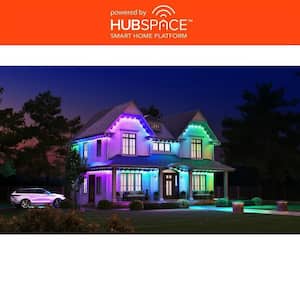
10-LED 16.4 ft. Plug-in Mini Integrated LED Novelty Permanent Outdoor String Light Expansion Set Powered by Hubspace
The Hampton Bay commercial grade permanent outdoor light expansion set lets you enhance your existing set of permanent outdoor lights, powered by Hubspace, with an additional 16.4 ft. and 10-LED pucks of vibrant colors and white lighting. With dedicated white LEDs, the Hampton Bay permanent outdoor lights feature tunable white technology, providing 50-lumens of white light from classic warm to cool whites. You can also showcase a beautiful gradient of colors to celebrate different festivities or set the perfect mood.
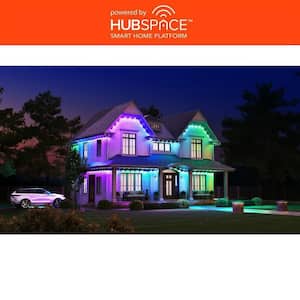
30 LED 50 ft. Plug-in Integrated LED Novelty Permanent Outdoor String Light Starter Kit Powered by Hubspace
The Hampton Bay commercial grade 50 ft. permanent outdoor light powered by Hubspace lets you enhance your outdoor exteriors with vibrant colors and white lighting. With dedicated white LEDs, the Hampton Bay permanent outdoor lights feature tunable white technology, providing 50 lumens of white light from classic warm to cool whites. You can also showcase a beautiful gradient of colors to celebrate different festivities or set the perfect mood.
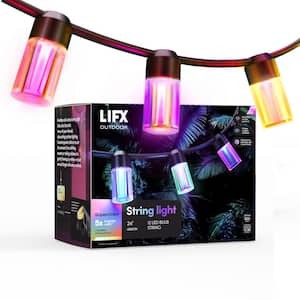
12-Light 24 ft. Outdoor Plug-In RGB Integrated LED Smart Wi-Fi String Light, Works with Alexa/Hey Google/HomeKit/Siri
Goodbye old-school string light, hello ultra futuristic 'envy-of-your-friends', vibe setting outdoor lighting. Create hypnotic effects to suit the moment, from shifting sunsets or rolling rainbows to gently flowing icy whites-or just set and forget with easy routines. This LIFX Smart Outdoor String Light is unlike any LED string lights you've ever seen. Not only can it illuminate your outdoor space with classic warm ambience, but it can shift into vibrant color and dynamic motion that will transform your garden into a wonderland. Each bulb on this string blends three color zones, creating unique tones and casting reflections that feel like, well, magic. Extend it up to 72 ft. by joining 3 sets for larger spaces. Want to set the mood for a special evening? No problem. With the LIFX app and a 2.4GHz Wi-Fi connection, you can effortlessly adjust your string lights to match any occasion. Whether it's a romantic dinner under the stars or a lively outdoor party, your lighting will always be on point. And for those who prefer a hands-free experience, these smart outdoor lights play nicely with all the major platforms, including Hey Google, Apple HomeKit, Amazon Alexa, and Samsung SmartThings. Just use your voice to command the perfect lighting setup, schedule to suit your lifestyle, or hit quick presets to elevate your outdoor space from ordinary to extraordinary.
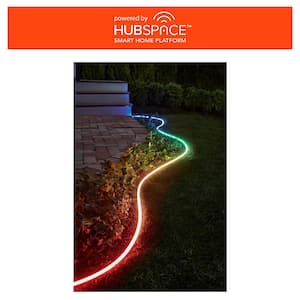
Smart 1000 Lumen 16 ft. White 120V Plug-in/12V Neon Flex LED RGB Outdoor Rope Light Powered by Hubspace (1-Pack)
Certainly not just another light, but a versatile Hampton Bay Neon Flex Lighting solution. This 16 ft. outdoor neon flex light lets you unleash millions of colors and dynamic effects, perfect for accenting patios, pathways, decks, gazebos, and even poolside.. With the Hubspace mobile app or the option to integrate with Alexa or Google voice assistants, you have full control over color, brightness, timers, schedules, and more - and no additional hub is required. This neon flex light doesn't stop at classic warm ambiance; it can also transform your garden into a wonderland with vibrant colors and dynamic motion. During the day, conserve energy with Deluxe Daylight White illumination, and as evening sets in, enjoy the soothing embrace of Soft White lighting. You have complete control with an adjustable color temperature range from 2700K to 6500K, or let your creativity run wild with a wide array of color options. Simply connect it to your home Wi-Fi 2.4GHz network to take command of colors and smart features. Whether you want to schedule it, set up routines, or activate quick presets when the party begins, this light can elevate your outdoor spaces from ordinary to extraordinary. Link up to 32 feet for larger areas. Its versatility makes it suitable for almost any location, offering ultimate lighting control and convenience. Illuminate your world in style with Hampton Bay Neon Flex Lighting.